











Apple switched the Magic Mouse to USB-C but left its most questionable design decision untouched, and that isn’t the only thing users dislike.
MOUTASEM PHOTOGRAPHY/Shutterstock
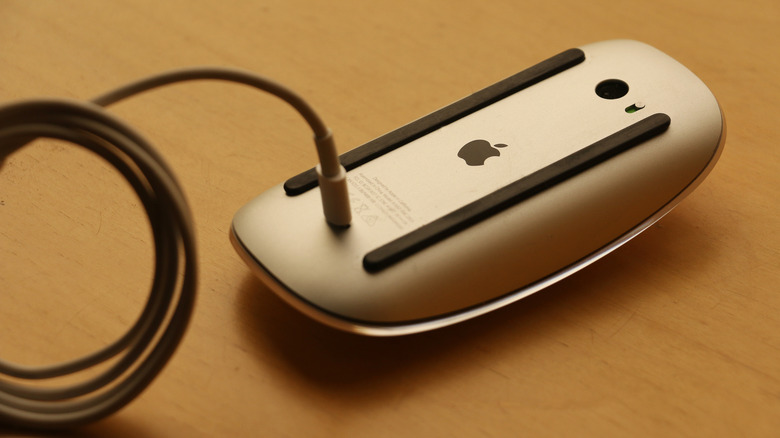
There are a handful of things that Apple’s Magic Mouse does that would make regular mice envious. The shimmery Multi-Touch surface lets you scroll sideways on a spreadsheet and move across macOS even without that conventional scroll wheel. But then, it is also brilliantly designed to be unusable when the charging cable is plugged in. That’s not a small trade-off, especially for a device whose very purpose is to make computer use a breeze.
And it isn’t the only reason even committed Mac users are calling it quits on the official Apple mouse. The weirdly slender body looks gorgeous but offers barely any palm space, while the aluminum sides aren’t universally loved either. For those who’ve used a traditional mouse for years, the controls on the Magic Mouse can also feel severely limiting.
Even after ditching the Lightning port with the 2024 refresh alongside the much faster M4 iMac, Apple decided to leave most of those pain points untouched. Now, in all honesty, the Magic Mouse has a pretty strong fan base, especially among users who love its touch gestures and that classic Apple minimalist design. But if you’re spending hours using it, the things it cuts out can matter a lot more than the cool tricks it has.
The Magic Mouse is awkward to charge and to hold
Crystal Eye Media/Shutterstock
Apple unveiled the rechargeable Magic Mouse 2 back in October 2015 with its Lightning port at the bottom. A seemingly controversial design choice even back then, it somehow survived the switch to USB-C almost a decade later. So, every time your Magic Mouse is out of juice, you need to flip it over and leave it be until there’s enough power to start using the mouse again.
The saving grace here is that the mouse’s battery is good for around a month or more between charges, so flipping your Magic Mouse on its back isn’t a daily ordeal. But that doesn’t make it any less weird, especially since Apple allows its Magic Keyboard and Magic Trackpad to be used while they’re plugged in. There’s also no clarity from Apple on how many years the rechargeable battery in the Magic Mouse is expected to last.
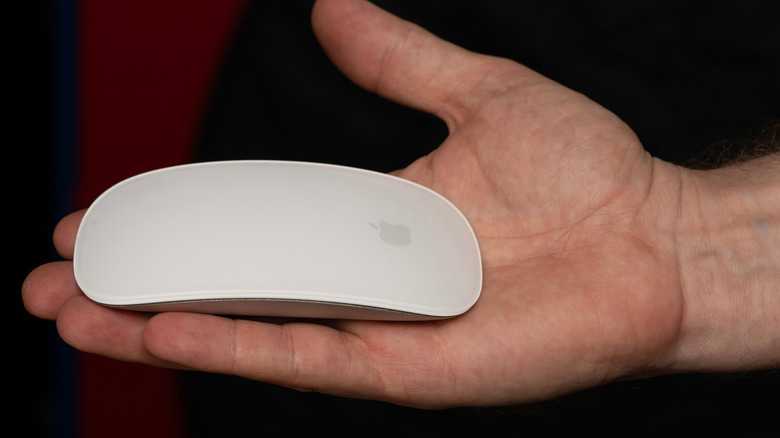
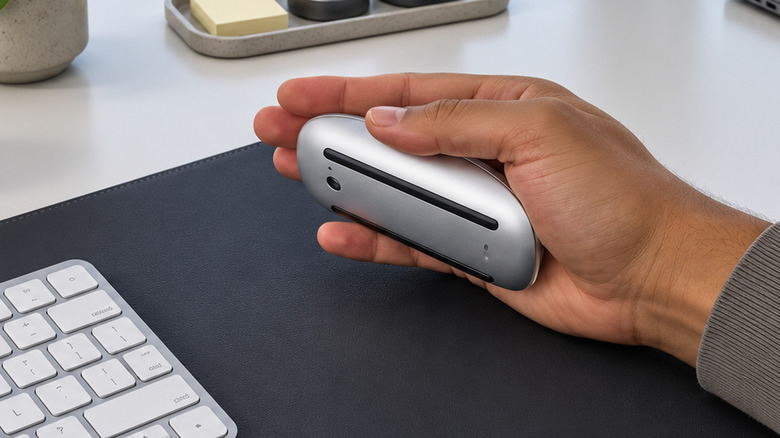
Now, let’s talk about that shape which puts this slim mouse at just 0.85 inches tall. There’s also barely any palm support, and depending on how you’re holding it, those aluminum edges can press uncomfortably against your fingers. If you use a fingertip grip, this might be less of a problem, but if you’re more of a “resting your entire hand on a mouse” type of person, adjusting your grip is something you’ll have to get used to.
The Magic Mouse has plenty of gestures but too few buttons
Husain Parvez/Engadget
Since Apple is asking $79 for the Magic Mouse in white and $99 for the black version, you’d expect the basic functions. While Apple’s mouse supports right-clicking with its touch-sensitive surface, there’s no middle-click or a programmable thumb button. Using CAD software is where you miss those buttons the most, since holding the middle mouse button is how you usually pan around drawings. Sure, third-party utilities can add some of the missing functionality, but having to install extra software to bring conventional features to a premium mouse is frustrating to say the least.
You’ve got to give some credit to the Multi-Touch surface, especially for making scrolling without the usual wheel still feel natural. But do expect accidental swipes like you would on a phone screen since there are no physical controls. Some owners have even faced issues like stuttering and inconsistent tracking. Those could very well be isolated incidents though, and in one case, the lag started right after a macOS update.
The good part is that Apple doesn’t force the Magic Mouse down your throat just because you own a Mac. You can use one of the best wireless mice from other brands on macOS, although you would be missing out on gestures that make the Magic Mouse so special. Logitech’s Signature M650, for instance, packs a typical scroll wheel and comes equipped with physical side buttons. Costing about half as much as the Magic Mouse at $39.99, the M650 comes with a contoured grip in place of the Magic Mouse’s glossy finish.