
What the tiny blue dot on your Android phone is telling you

An app just checked your location.
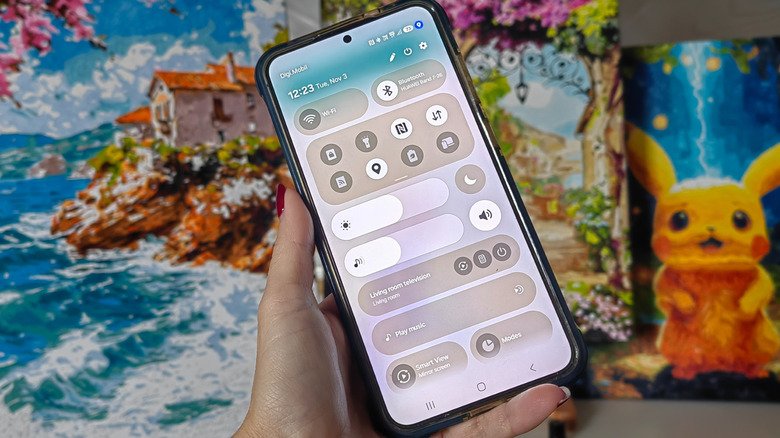
You’re scrolling through your phone when you spot it: a small blue dot sitting quietly near your battery icon. It wasn’t there a minute ago, and now it’s gone again just as fast. If you’ve wondered if it’s a glitch, don’t worry — we all have. It’s not a notification you missed or even a problem or a bug. The blue dot is actually one of Android’s built-in security features designed to keep you informed about what’s happening on your device in real time. More specifically, it tells you when an app is accessing your location data.

Rather than burying this information in a settings menu you’d have to dig through, Android makes it easy to see right alongside all your other notification icons. The blue dot matters more than it might seem because location data is some of the most sensitive information your phone collects. It can reveal where you live, work, buy your groceries and spend your free time. Apps access this data for legitimate reasons, like turn-by-turn directions for your driving companion or local weather. But if you see the dot flashing on and off when you haven’t opened a navigation app, you may want to do a bit of sleuthing.

What does the blue dot actually mean on Android?
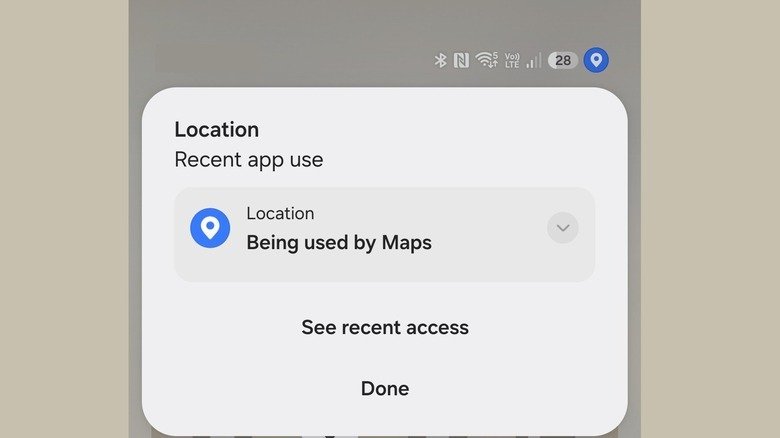
The blue dot is Android’s visual indicator that an app is actively tracking your device’s location. It typically pops up in the top-right corner of your screen beside other status icons like Wi-Fi, battery and signal bars. When it shows up, an app on your phone is pulling location data through GPS, Wi-Fi signals or nearby cellular towers to figure out where you are.

This indicator is part of a broader push from Google to make privacy more transparent. A tiny green dot, for instance, indicates some app has accessed your camera or your microphone. Older Android versions kept location permissions tucked away in settings menus where most people rarely checked them, but the current system switches things around to make such sensitive information easier to find. Android’s developer documentation shows the indicator is tied to active app behavior on Android 17 and newer, with the location dot reflecting usage that’s either currently running or occurred within the last 10 seconds, specifically for apps operating in the foreground.

Basically, the dot isn’t meant to track every historical instance of location access, but rather to flag what’s happening right now or what just happened moments ago. If you spot the dot while you’re using a maps app, that’s perfectly expected. If it pops up when you haven’t touched an app or website that should need your location, it’s time to dig more.

Swiping down from the top of your screen and tapping the indicator typically reveals which app triggered it, giving you an immediate answer without having to guess.

One small mention here — older One UI versions on Samsung phones only displayed a location pin icon in the status bar. Starting with One UI 9, however, the brand adopted the same blue pin the Pixel gets.

How to manage location permissions and app access
Noticing the indicator is the first step; knowing how to act on it is what actually protects your privacy. Android makes it pretty straightforward to review and adjust which apps can access your location.

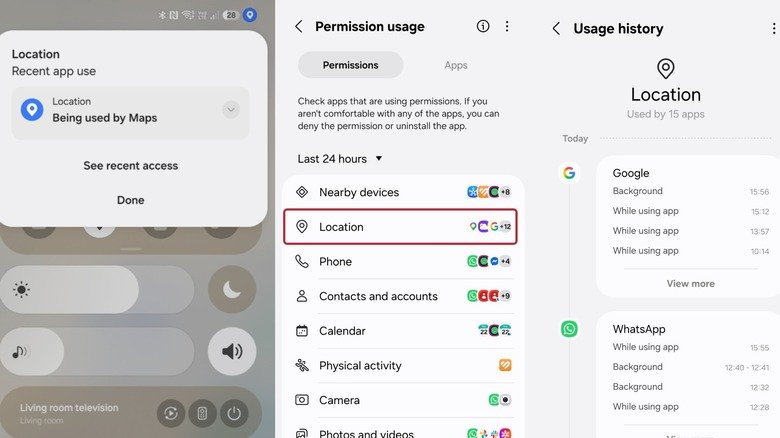
If you “catch” the notification, it will tell you which apps are using your location right that instant. If you tap on See recent access and then choose Location, you’ll get a much more extensive usage history, telling you what time your location was checked and whether this was done when you were using the app or while working in the background. Tapping on any of the entries will take you directly to that app’s location permission settings so you can choose in which circumstances, if at all, you want to allow it to check up on you. Alternatively, you could take the long way and go to Settings > Security and privacy (or Privacy Controls) > Privacy > Permissions used in last 24 hours > Location.

For apps that genuinely need location to function well, like weather services or navigation tools, setting permissions to “allow only while using the app” seems reasonable as you’ll still get accurate directions or local forecasts. The app won’t be able to track your movements once you close it, and that’s reassuring.

Don’t miss these tips!

We don’t spam! Read more in our privacy policy

LEAVE A REPLY

Please enter your comment!
Please enter your name here

Hot this week

What are the animals in your home learning from each other?

LEARNING FROM EACH OTHER Leaf, Sunshine, and Cuddles The animals who...

AI Is Thriving at Capital One

If one were making a list of the companies...

25+ Must-Haves for Any SPED Teacher

Being a special education teacher is tough, but so...

Are Crows and Parrots Really the Smartest Birds?

Kelsey McCune wanted to study smart birds, so naturally,...

Topics

What are the animals in your home learning from each other?

LEARNING FROM EACH OTHER Leaf, Sunshine, and Cuddles The animals who...

AI Is Thriving at Capital One

If one were making a list of the companies...

Southern Ontario Gothic

Welcome to the Zoomer Age, where no one has...

Damage

In the opening moments of his second album, Damage,...

Are Crows and Parrots Really the Smartest Birds?

Kelsey McCune wanted to study smart birds, so naturally,...

Related Articles

Popular Categories

News Feed

Windows 11 is finally adding an easier way to disable the Sticky Keys pop-up

There’s a checkbox that simply turns it off. ...

How to use your iPhone to take the best picture of the Moon

With some easy adjustments, you can upgrade your...

Gmail users should know about this little-noticed feature

You can unsend messages on Gmail, but you...

The reason your laptop can get hot after extended use

Laptops can sometimes run hot, but there are...

Serbia’s Student Movement: From Protest to Power

LONDON, November 9 (IPS) - On the night of 25 October, tens of thousands filled the streets of Belgrade and other cities, as...

Venmo finally launches an in-app bill splitting feature

The receipt-scanning feature is rolling out now. ...

Uber is launching its own parking reservation service

Uber Parking is built on the company's acquisition...

Why EV fast charging slows down after 80 percent

It doesn't mean you have a bad battery. ...

NHTSA investigates if Waymo robotaxis are still running school bus stop signs

Waymo’s 2025 software recall may be less effective...

NHTSA investigates if Waymo robotaxis are still running school bus stop signs

Waymo’s 2025 software recall may be less effective...

Think twice before using a webcam cover on your MacBook

Webcam covers can help protect your privacy, but...

Think twice before using a webcam cover on your MacBook

Webcam covers can help protect your privacy, but...

Meta is expanding AI age detection for Instagram teen accounts

The company will increase its use of the...

Meta is expanding AI age detection for Instagram teen accounts

The company will increase its use of the...

The pros and cons of using OnePlus smartwatches

OnePlus watches offer great battery life for the...

The pros and cons of using OnePlus smartwatches

OnePlus watches offer great battery life for the...

Drought Cripples Dairy Farmers in Maharashtra in ‘Off the Charts’ Weather Year

PUNE, India & ANTALYA, Türkiye, November 9 (IPS) - Dairy farmer Sagar Pawar has to buy water and fodder at inflated rates to...

Get a Free Tool or Battery With These Milwaukee Tools and Accessories at The Home Depot

Buy One Get One: Buy a new Milwaukee tool or accessory from The Home Depot and get a free battery or tool included with...

Popular articles

Windows 11 is finally adding an easier way to disable the Sticky Keys pop-up

There’s a checkbox that simply turns it off. ...

How to use your iPhone to take the best picture of the Moon

With some easy adjustments, you can upgrade your...

Gmail users should know about this little-noticed feature

You can unsend messages on Gmail, but you...

The reason your laptop can get hot after extended use

Laptops can sometimes run hot, but there are...

Serbia’s Student Movement: From Protest to Power

LONDON, November 9 (IPS) - On the night of 25 October, tens of thousands filled the streets of Belgrade and other cities, as...

Venmo finally launches an in-app bill splitting feature

The receipt-scanning feature is rolling out now. ...

Uber is launching its own parking reservation service

Uber Parking is built on the company's acquisition...

Why EV fast charging slows down after 80 percent

It doesn't mean you have a bad battery. ...

NHTSA investigates if Waymo robotaxis are still running school bus stop signs

Waymo’s 2025 software recall may be less effective...

NHTSA investigates if Waymo robotaxis are still running school bus stop signs

Waymo’s 2025 software recall may be less effective...

Think twice before using a webcam cover on your MacBook

Webcam covers can help protect your privacy, but...

Think twice before using a webcam cover on your MacBook

Webcam covers can help protect your privacy, but...

Meta is expanding AI age detection for Instagram teen accounts

The company will increase its use of the...

Meta is expanding AI age detection for Instagram teen accounts

The company will increase its use of the...

The pros and cons of using OnePlus smartwatches

OnePlus watches offer great battery life for the...

The pros and cons of using OnePlus smartwatches

OnePlus watches offer great battery life for the...

Drought Cripples Dairy Farmers in Maharashtra in ‘Off the Charts’ Weather Year

PUNE, India & ANTALYA, Türkiye, November 9 (IPS) - Dairy farmer Sagar Pawar has to buy water and fodder at inflated rates to...

Get a Free Tool or Battery With These Milwaukee Tools and Accessories at The Home Depot

Buy One Get One: Buy a new Milwaukee tool or accessory from The Home Depot and get a free battery or tool included with...