
How to get warnings about speed cameras in Apple CarPlay

CarPlay is just the messenger, while your navigation app does all the hard work.
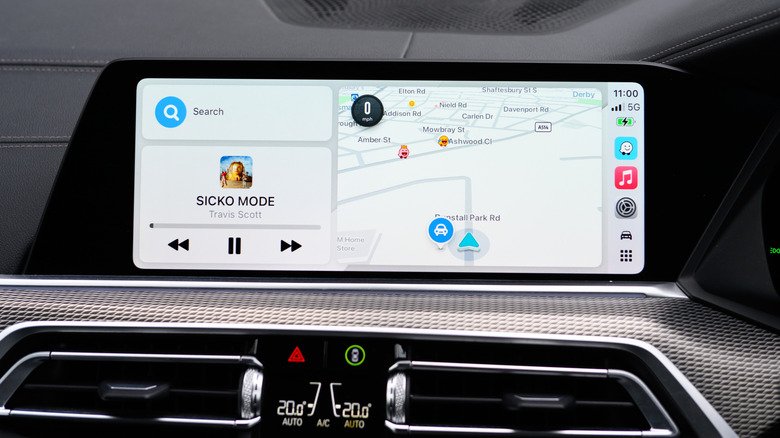
With all the rage and controversy over Flock cameras, speed cameras (or speed traps) have taken a back seat. Most of us have to deal with speed cameras (though they’re banned in some states and limited in others), and Apple CarPlay is one way to handle them. While CarPlay itself doesn’t send out speed camera warnings, alerts can be turned on for whichever navigation app you use. It stands to reason that Apple CarPlay users default to Apple Maps, but there are other, equally useful alternatives like Waze and Google Maps. There’s always a caveat, however. Regardless of the nav app you use, mobile speed traps, by definition, move around a lot. Unless someone reports the new position on a given app, you won’t get a warning.

Mobile speed detectors (in some form or another) have been around since the first speeding arrest in the US in 1899. A NYC taxicab driver named Jacob German was caught going 12 mph in an Electrobat (nearly the speed of light back then) in an 8 mph zone. The mobile units in those days were police officers on bicycles. Fortunately, modern technology provides drivers with information as it changes, but there’s no such thing as a navigation app that knows where every camera is at all times.

Getting your navigation app to speak up

In Apple Maps, there is no camera switch to toggle on or off. Camera alerts are automatic in supported regions. Waze, a compatible CarPlay navigation app, turns camera alerts on by default. You have the option to fine-tune them as well. In the Waze app, open Settings > Alerts and Reports > Reports > Cameras. Each camera type has its own toggles for “Show on map” and “Alert while driving.” Make sure any changes made in the Waze app take place before connecting to CarPlay, because Waze only applies them the next time you connect and go for a drive.

Google Maps is similar yet has slightly different settings. On CarPlay, tap “Report” to pinpoint a mobile speed camera so other drivers can see when using the app. If you want information provided by other drivers, open Google Maps in CarPlay and tap Settings > Alert options > All alerts. 

Some navigation apps will send warning alerts without actively navigating, as long as the app is running passively in the background. Radarbot sends alerts for fixed and red light cameras through CarPlay if you have a Gold membership. Roadar adds Flock cameras to the mix, along with other license plate readers mixed in, with speed and red light camera alerts. If you’re more concerned about Flock cameras, FlockHopper is free and works with CarPlay as well.

Does Apple CarPlay tell you the speed limit?

It can, though it depends on what navigation app you’re using. With Apple Maps, the Speed Limit toggle is in Settings > Apps > Maps > Driving. The posted limit will appear on screen while you navigate. With the Waze app, make sure you’re disconnected from CarPlay, open Waze and tap Settings > Speedometer > Show Speedometer > Set Preferences > Show Speed Limit. Google Maps is similar to Waze, with the speed limit located in the speedometer settings. Open the Google Maps app, tap your profile picture and tap Settings > Navigation > Driving > Speedometer.

Stock CarPlay doesn’t include a speedometer, but apps like Waze and Google Maps will display current speeds through CarPlay if you want. Both Google Maps and Waze will warn you if your speeds climb too high, and Waze will give you a heads-up if speed limits are about to drop sharply. In response to car manufacturers ditching CarPlay, Apple introduced CarPlay Ultra, which displays your current speed on the instrument cluster, unlike regular CarPlay. CarPlay Ultra is fully integrated, so it’s not an informational speed display, as Google Maps makes clear about its own speedometer.

Don’t miss these tips!

We don’t spam! Read more in our privacy policy

LEAVE A REPLY

Please enter your comment!
Please enter your name here

Hot this week

Aura’s newest e-ink photo frame is even better and more affordable than its last

If you’re into interior design, decorating, or just love...

Jensen Huang’s Troubles Leave the AI Industry Reeling

No executive has pulled the strings in the artificial...

Featured Artist | Karen Glykys

Karen Glykys Maidstone, Kent, UKwww.zealous.co/karenglykys/portfolio@karenglykys I am a self taught, emerging,...

Developing countries face climate finance deficit as loan payments soar

With rich governments and development banks delivering more climate...

Topics

AI Is Thriving at Capital One

If one were making a list of the companies...

What are the animals in your home learning from each other?

LEARNING FROM EACH OTHER Leaf, Sunshine, and Cuddles The animals who...

Featured Artist | Karen Glykys

Karen Glykys Maidstone, Kent, UKwww.zealous.co/karenglykys/portfolio@karenglykys I am a self taught, emerging,...

Featured Artist | Darrell Black

Darrell Black Frankfurt, Germanyhttp://darrell-black.pixels.com/@definismart My Darrell Urban Black, an American visual...

Related Articles

Popular Categories

News Feed

How to clear the application cache on your Mac

Clearing app caches don’t necessarily make your Mac...

The pros and cons of using your phone as a mobile hotspot

Skip the questionable coffee shop Wi-Fi and bring...

The pros and cons of using cloud storage over local storage

Cloud storage can be super convenient, but there...

10 things your iPhone’s Notes app can do other than taking notes

Apple Notes has a lot of tricks you...

What causes a sudden drop in phone battery percentage?

An aging battery or a recent software update...

Here’s what actually happens if your laptop battery is completely drained

A dead battery might do more damage than...

Why your Wi-Fi slows down when more devices connect

Your Wi-Fi router is like a busy train...

How long can a 1000 watt-hour power station run your devices?

Determining the stamina of your portable power station...

Watch UEFA Nations League Soccer: Livestream Spain vs. England From Anywhere for Free

The stage is set for an absorbing UEFA Nations League clash between Group A3 frontrunners Spain and England on Sunday, with Thomas Tuchel’s Three...

Samsung is discontinuing these useful mobile apps in December

You don’t have long to grab the augmented...

How one 13-year-old is helping solve a huge solar panel limitation

Tired of moving solar-powered Christmas lights, a seventh...

How to tell whether your car supports Apple CarPlay

Most newer cars do, but there are a...

AO3 is back online but with limited features

The outage lasted two weeks but full functionality...

How to get the most protection from your Ring camera security system

Simply putting the camera on your front door...

Spain v England: Nations League – live

Client Challenge ...

Wi-Fi 8 is an attempt to fix the biggest problem with wireless internet

Because perfection currently remains just out of range. ...

8 Instant Observations on Jaguars’ Week 10 Win Over Titans: Travis Hunter’s All-Pro Case

JACKSONVILLE, Fla. -- The Jacksonville Jaguars have won, again. The Jaguars are one of the NFL's best teams and were widely expected to pull...

The Referees Have Some Explaining to Do As Panthers Continue to Suffer

The Carolina Panthers make it easy for the referees to penalize them. They commit a ton of really stupid penalties that are pretty obvious....

Popular articles

How to clear the application cache on your Mac

Clearing app caches don’t necessarily make your Mac...

The pros and cons of using your phone as a mobile hotspot

Skip the questionable coffee shop Wi-Fi and bring...

The pros and cons of using cloud storage over local storage

Cloud storage can be super convenient, but there...

10 things your iPhone’s Notes app can do other than taking notes

Apple Notes has a lot of tricks you...

What causes a sudden drop in phone battery percentage?

An aging battery or a recent software update...

Here’s what actually happens if your laptop battery is completely drained

A dead battery might do more damage than...

Why your Wi-Fi slows down when more devices connect

Your Wi-Fi router is like a busy train...

How long can a 1000 watt-hour power station run your devices?

Determining the stamina of your portable power station...

Watch UEFA Nations League Soccer: Livestream Spain vs. England From Anywhere for Free

The stage is set for an absorbing UEFA Nations League clash between Group A3 frontrunners Spain and England on Sunday, with Thomas Tuchel’s Three...

Samsung is discontinuing these useful mobile apps in December

You don’t have long to grab the augmented...

How one 13-year-old is helping solve a huge solar panel limitation

Tired of moving solar-powered Christmas lights, a seventh...

How to tell whether your car supports Apple CarPlay

Most newer cars do, but there are a...

AO3 is back online but with limited features

The outage lasted two weeks but full functionality...

How to get the most protection from your Ring camera security system

Simply putting the camera on your front door...

Spain v England: Nations League – live

Client Challenge ...

Wi-Fi 8 is an attempt to fix the biggest problem with wireless internet

Because perfection currently remains just out of range. ...

8 Instant Observations on Jaguars’ Week 10 Win Over Titans: Travis Hunter’s All-Pro Case

JACKSONVILLE, Fla. -- The Jacksonville Jaguars have won, again. The Jaguars are one of the NFL's best teams and were widely expected to pull...

The Referees Have Some Explaining to Do As Panthers Continue to Suffer

The Carolina Panthers make it easy for the referees to penalize them. They commit a ton of really stupid penalties that are pretty obvious....